ome-zarrpari
Load and use OME-Zarr 0.4 and 0.5 images and labels in napari, from any data source!
Images are loaded into a napari multiscale image layer. This means higher resolution levels of the data are progressively loaded as you zoom in.
This plugin also: loads label groups; sets axis labels, units, and scales.
Usage
This is what the widget looks like:
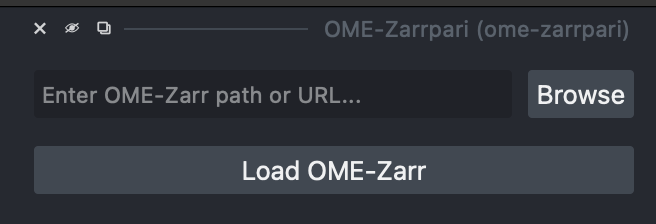
You can either copy/paste a URL or local path into the text box, or press "Browse" to open a file browser and select a local directory. Then press the "Load OME-Zarr" button to load the image.
Programmatic usage
If you already have a Zarr group you want to add to a napari Viewer, you can use:
ome_zarrpari.load_ome_zarr(viewer, group, *, visible=True)

Load an OME-Zarr file into a napari viewer.
Parameters:
| Name | Type | Description | Default |
|---|---|---|---|
viewer
|
Viewer
|
Viewer to add data to. |
required |
group
|
Group
|
Open OME-Zarr group. |
required |
visible
|
bool
|
Set visible status of any created napari layers. |
True
|
Returns:
| Name | Type | Description |
|---|---|---|
layers |
dict[Image | Labels, AnyImage | AnyImageLabel]
|
Dictionary mapping the layers added to their original OME-Zarr metadata models. |
Installing
If napari is not already installed, you can install ome-zarrpari with napari and Qt via:
Warning
After installing, be sure to enable napari's asyncronous mode.
Without this browsing data will be very slow.
You can either go to "Preferences" > "Experimental" to enable it, or set the ASYNC_NAPARI environment variable to 1 before launching napari.
FAQ
What's the difference between ome-zarrpari and napari-ome-zarr?
napari-ome-zarrhas no widget. The only way to load remote datasets is launchingnaparion the command line, or using Python scripting in thenapariterminal.ome-zarrparisupports OME-Zarr 0.4 and 0.5;napari-ome-zarronly supports version 0.4 (as of writing).ome-zarrpariexplicitly supports all versions of Python supported bynapari.
How can I process OME-Zarr data once it's been loaded?
Images are loaded into napari multiscale images.
The list of images in napari can be found in the viewer.layers list.
Each multiscale image in the list has a image.data attribute, which stores a list of the multiscale image levels.
Each item in this list is a dask.Array, which wraps a zarr.Array under the hood.
The image at index i is downsampled by a factor of 2**i.
Changelog
1.0.2
- Fix loading OME-Zarr 0.5 labels that are associated with an image.
- Data is now always loaded into a
daskarray, as promised above. This allows it to take advantage of naparis built in data caching.
1.0.1
- Fix loading OME-Zarr 0.5 data that uses a v2 chunk encoding for the arrays.
- Add an explicit
naparidenpendency.
1.0.0
First release